top of page

quick
mobile app
rEMMITANCE
Q : How can you check your transaction status?
A : Click "ORDER LIST" on your Qpay app main page.
Q : What is the meaning of "NEW" in your status?
A : It means your transaction order is NEW, and you haven't paid in Minimart.
Q : What is the meaning of "PAID" in your status?
A : It means that your payment in Minimart is successful.
Q : What is the meaning of "PROCESS" in your status?
A1: For bank account, it means your cash remit is on process of transferring to the beneficiary's bank account.
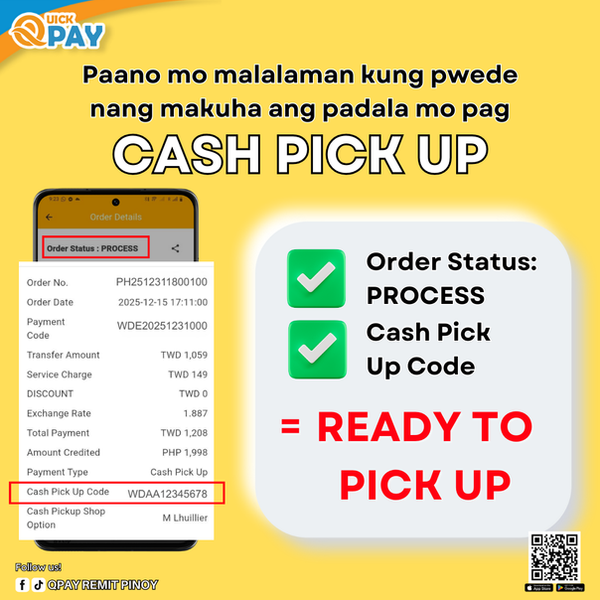
A2: For cash pick up, if the status is PROCESS and the CASH PICK UP CODE is available, it means your cash remit is ready for pick up and your receiver can already claim it.
Q : What is the meaning of "DONE" in your status?
A1: For bank account, that means your payment has already been transferred to the beneficiary's bank account .
A2: For cash pick up, that means the beneficiary have claimed your cash remit already .
Q : What is the meaning of "CANCEL" in your status?
A: It means you didn't pay for your transaction & order has been cancelled.

bottom of page