
quick
mobile app
rEMMITANCE
How to FORGOT
Password + Phone Number
ACCOUNT RETRIEVAL PROCESS

STEP 1
Click "Login"
STEP 2
Click "FORGOT PASSWORD"


STEP 3
Click "FORGOT YOUR PHONE NUMBER?"

STEP 4
Fill up your information
Click "SUBMIT"

STEP 5
Enter SMS verification code that send to your NEW PHONE NUMBER
Click "CONFIRM"
STEP 5
Enter *ARC *NEW PASSWORD
Click "LOGIN"

STEP 7
Upload *ARC photos *Selfie
Follow the steps and click "CONFIRM"
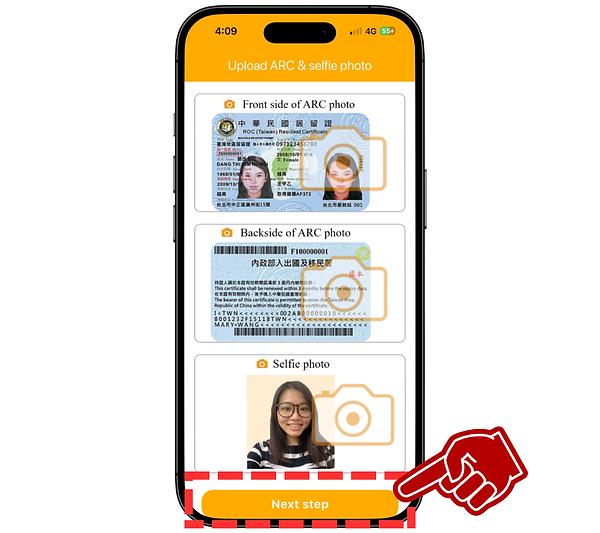
☑ Requirements
ARC photo
The submitted photograph must present a ARC card. The image must be clear, sharp, and entirely free of blur, pixelation, or any visual distortion.
Selfie photo
Please take a selfie with your entire face clearly visible (no mask or mouth covering).
Mobile number
Please enter the mobile number you're currently using; we'll send a verification code via SMS to it.
New password
Please create a new password (if insert old password here will be rejected)
Account retrieval
Attempting to log in with your old password will trigger a security lock on your account. If this occurs, simply reach out to our customer service for help regaining access.